07 December, 2012

TP Link TL-WA830RE 300Mbps Wireless N Range Extender

Just to add few lines on this piece of hardware  since one can easily get only the positive side of the device and miss (as usual) some annoying problems.

Pros
  • It really extends the range of your WiFi signal (when it works)
  • Very reasonable price.
  • Relatively easy to set up (avoid the CD setup).

Cons
  • The connection drops regularly and the only working solution is to reboot the device. There are many complaints about it but they are overwhelmed by positive, one day use opinions (I felt the same way at the beginning). Here are several negative comments that tell the same story all over again link.
And just to be fare: I spent some time searching for solution without success but also I found that other wireless range extenders also suffer from the same problem... so... I tried to use the option that ping-s the main router and reboots the device if necessary - not enough. Next I will use an automatic switch to reboot the device on defined intervals and obviously my success depends on the right choice (if there is such)...

Update: Just forget everything that I wrote before (above)! You just need to flash it with the DD-WRT firmware - instructions here (needs registration to be able to see/download the files). It is amazing! It turns this worthless piece of hardware to something really impressive!

01 November, 2012

ThinkPad Tablet: - after 10 months of use

As usual, this is not meant to be full review. I will rather mention some of my personal experience, that might be not mentioned in other reviews.


Overall:
I will call it "classic style". It looks bulky and a bit unattractive. To be honest I was looking after Transformer Prime, so it went unnoticed on first reading. Until I was pointed out the particular features:
  • NVIDIA® Tegra™ 2 Dual-Core 1GHz processor
  • pen  with Corning® Gorilla® Glass
  • 64GB storage
  • full-size SDHC slot
  • 3G connectivity
  • regular USB 2.0
  • mini HDMI
  • mini USB... 
  • the rest is typical
  • The price was more than reasonable.

14 June, 2011

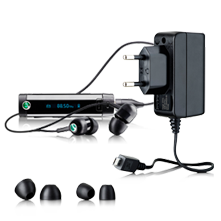
Sony Ericsson MW600: just my opinion

Well, this is old news. So, I will just share my opinion.

Just to mention what is it - a bluetooth headset and high quality stereo bluetooth headphones in one. Yes, those are two different devices that you can simultaneously pair to three different devices. For instance, you can listen to music from your computer (by connecting to the stereo headset) and answer a call on the phone that is paired at the same time to the device - neat!

As a bonus, there is an FM radio built in, nice OLED display, touch sensitive volume up/down slide that I personally dislike.

Pros:
  • excellent design and quality.
  • reasonable battery life.
  • standard 3.5 mm stereo headphone jack.
  • stable connection (tested with HTC Wildfire and PC).
  • micro USB charger.
Cons:
  • inconvenient volume control - it newer works from the first time...
  • the quality of the sound with the originally shipped earpieces is a bit bad!  The device produces very good sound (signal) that is almost wasted by the originally provided earpieces. Update: OK.., compared to many other in-ear headphones they are rather OK...
  • the device can't be used while charging.

06 March, 2011

Efficient use of Android smart phone without contract or Internet access plan

Well, what I need my phone is:
  • to make and receive phone calls and SMS...
  • browse internet, use e-mail on some occasions...
  • to find my way using the GPS...
The rest I can do from my computer, that I am almost constantly using in my job.

This actually does not require contract and Internet access plan from your mobile provider. I use prepaid card with reasonable prices (for prepaid card) for Internet access. I try to fully utilize the wifi access I have at work and home (were I spent most of my time) and use the mobile connection for those occasions when I need Internet on the road. The phone turns automatically every 1 hour the Wifi to sync my device but only if I am at work, home or other predefined place where I have Wifi access.

Here is how it is done:

I found Tasker perfect for this job.
I use schedule to sync every 1 hour between 8:00 and 20:00. The sync procedure first checks if the phone is in a predefined location, based on the GSM Cell ID. If yes, it turns ON "Wifi" and "Auto Sync" if the battery has more than 20% charge left and turns it OFF after 3 minutes (enough to sync Google contacts, calendars and other mails). 
With this setting, the phone runs as regular GSM (that does not require much power) and this way my HTC Wildfire runs about 4-5 days on regular use on one charge.


Some other hints for "off the grid" use:

Osmand is turn by turn navigation application for Android Devices with online/offline features. It also has online routing and audible navigation. The application is open source and the offline data is based on OpenStreetMap - the free wiki map (OSM).

Dropbox syncs your files online and across computers for access anywhere. Sync your files between your computers and your mobile device. Now you can browse the files in your Dropbox folder from anywhere! Share links to files, save photos and video from your camera to your computers, and open files using your favorite Android apps.

To keep the applications up to date, I tun ON the Wifi while charging...


Here is how a regular charge/discharge looks like with this configuration:

19 February, 2011

Samsung JET S8000 vs. HTC Wildfire (smarter than smart phone vs. entry level smart phone)


Or why "Samsung JET S8000" has nothing to do with "smart" or "smart phone" at all....

Ok, I could not bear it more... I got HTC Wilfire replacement... And here is just few points why.

In red color is the clear loosing side and in green - the winning.

I challenge anybody to prove me wrong in my statements!
Samsung JET S8000 HTC Wildfire
Numbers with country code and without are considered as different numbers.
My provider sends the the caller number without the code and SMS with - as result I have to add in every contact both versions in order to be recognized normally.[5,6]
What?!?
This is not serious...
All my previous phones did not have this problem, even with this particular provider...
Every program group have their own Internet access profile.
Let me count: widgets, browser, GPS, Java programs, e-mail, active sync.
So, every time I was connecting to Internet I made sure that I have selected the proper profile!!!
What for?
When you turn Wifi ON, it checks for available predefined access profile and connects. One can explicitly disable the mobile provider connection or all synchronizing services... so simple and intuitive
Touch sensitivity
- resistive - simply unacceptable.[5]

Pointless to compare - capacitive.
Virtually no support for additional widgets or programs. Only Java alternatives. Just look what is available on the Android market.
Bluetooth:
Every time it connect you need to confirm the connection... Every time the connection is lost and you want to reconnect!

Automatically connects and reconnects any paired device.
Graphical interface:
Mediocre graphical interface - I really expect more from 480x800 pixels resolution...

240x320 pixels is on the border for this size screen but it is acceptable and the GUI is simply perfect.
Ridiculous lock screen - time and date. You have to unlock to see any events. Excellent. Events can be marked by flashing led as well.
Video player:
HERE the JET is unbeatable! Many formats, and large resolutions - excellent! DLNA server (I have never used it). Analog TV out (PAL&NTSC).

Wildfire is not a near match...
Music player:
- with good head phones it sound almost perfect, sound profiles, fancy art, no option to only play files in certain folder.

Simple player, art is fine, no sound profiles, good sound.
GPS
- on-line Google maps (without navigation)
- maps are locally stored
- impossible to import POI
- expensive navigation fees

- on-line Google maps and navigation

- mobile data plan(rouming) dependent
- Free off-line maps applications i.e. RMaps..
Contacts, mail and calendar synchronization
- it feels almost as gambling. I was left in two occasions without a single contact in my address book...


- absolutely flawless to sync with Gmail service.
SMS
- SMS capabilities of a regular phone and limit of about 200 SMS to store, because it stores them on the SIM card?!

- unlimited features and SMS number limited only by the storage of your phone.
Text input
- a bit small keyboard

- unlimited features
Updates:
What updates?!? ...well I was lucky to get one quite easy firmware update...[4]

Automatic.
PC suite
Samsung New PC - bulky, does not provide full access to your phone features, no backup.
HTC Sync
I have not tested it yet...


This table will obviously continue to expand...

Anyway, the above summarizes why I think Samsung Jet S8000 is not even close to a smart phone, not even a good mobile phone. It is some sort of semi-advanced media player with phone features.

More links on the subject from the same author (make sure you read the bottom two reviews):
  1. Samsung Jet S8000: ActiveSync and Google 
  2. Samsung Jet S8000: use as modem (via Bluetooth) to connect to Internet 
  3. Samsung Jet S8000: eduroam settings
  4. Samsung Jet S8000: firmware update from NPS 
  5. Samsung Jet S8000: second round
  6. Samsung Jet S8000: my personal opinion
    P.S. I have never believed the commercial "Smarter than Smart Phone", that is obviously lie, but I never expected to be so bad... I do not associate with brands, but that particular phone felt like scream in my face ".......".